
xpiks tutorials
xpiks tutorials
  • Tutorials
    • Getting started
      • - Adding files
      • - Basic editing
      • - Saving changes
      • - Uploading files
    • Interface
      • - Main window
      • - Single editing view
      • - Batch editing view
      • - Upload dialog
      • - Hotkeys
      • - Filtering
      • - Color tags PRO
    • Keywording
      • - Overview
      • - Spelling
      • - Duplicates
      • - Reorder keywords
      • - Batch delete keywords PRO
      • - AI keywording PRO
    • Suggestions
      • - Overview
      • - Reverse image search PRO
      • - Miscellaneous
      • - Similar images PRO
    • Batch editing
      • - Overview
      • - Partial changes
      • - Appending keywords
    • Uploading
      • - Upload history PRO
      • - Failed uploads
      • - Custom FTP directory PRO
      • - Background upload PRO
      • - Cloud upload PRO
      • - Upload troubleshooting
      • - Agency credentials
    • Presets
      • - Overview
      • - Inserting
      • - Autocomplete
      • - Groups PRO
    • QuickBuffer
      • - Overview PRO
    • Plugins
      • - Installation PRO
      • - Using plugins PRO
    • Integrations
      • - Lightroom PRO
      • - Export CSV
      • - Import CSV PRO
    • License
      • - Activate your license
      • - Start Xpiks Pro trial
      • - Contact support PRO
    • Translator
      • - Overview
    • Miscellaneous
      • - Settings sync PRO
      • - Installing on Windows
      • - Adding copyright PRO
      • - Find and replace PRO
      • - Check Xpiks version
      • - Wipe all metadata
  • Plugins
    • Getting started
      • - Adding files
      • - Basic editing
      • - Saving changes
      • - Uploading files
    • Interface
      • - Main window
      • - Single editing view
      • - Batch editing view
      • - Upload dialog
      • - Hotkeys
      • - Filtering
      • - Color tags PRO
    • Keywording
      • - Overview
      • - Spelling
      • - Duplicates
      • - Reorder keywords
      • - Batch delete keywords PRO
      • - AI keywording PRO
    • Suggestions
      • - Overview
      • - Reverse image search PRO
      • - Miscellaneous
      • - Similar images PRO
    • Batch editing
      • - Overview
      • - Partial changes
      • - Appending keywords
    • Uploading
      • - Upload history PRO
      • - Failed uploads
      • - Custom FTP directory PRO
      • - Background upload PRO
      • - Cloud upload PRO
      • - Upload troubleshooting
      • - Agency credentials
    • Presets
      • - Overview
      • - Inserting
      • - Autocomplete
      • - Groups PRO
    • QuickBuffer
      • - Overview PRO
    • Plugins
      • - Installation PRO
      • - Using plugins PRO
    • Integrations
      • - Lightroom PRO
      • - Export CSV
      • - Import CSV PRO
    • License
      • - Activate your license
      • - Start Xpiks Pro trial
      • - Contact support PRO
    • Translator
      • - Overview
    • Miscellaneous
      • - Settings sync PRO
      • - Installing on Windows
      • - Adding copyright PRO
      • - Find and replace PRO
      • - Check Xpiks version
      • - Wipe all metadata
  • Blog
    • Getting started
      • - Adding files
      • - Basic editing
      • - Saving changes
      • - Uploading files
    • Interface
      • - Main window
      • - Single editing view
      • - Batch editing view
      • - Upload dialog
      • - Hotkeys
      • - Filtering
      • - Color tags PRO
    • Keywording
      • - Overview
      • - Spelling
      • - Duplicates
      • - Reorder keywords
      • - Batch delete keywords PRO
      • - AI keywording PRO
    • Suggestions
      • - Overview
      • - Reverse image search PRO
      • - Miscellaneous
      • - Similar images PRO
    • Batch editing
      • - Overview
      • - Partial changes
      • - Appending keywords
    • Uploading
      • - Upload history PRO
      • - Failed uploads
      • - Custom FTP directory PRO
      • - Background upload PRO
      • - Cloud upload PRO
      • - Upload troubleshooting
      • - Agency credentials
    • Presets
      • - Overview
      • - Inserting
      • - Autocomplete
      • - Groups PRO
    • QuickBuffer
      • - Overview PRO
    • Plugins
      • - Installation PRO
      • - Using plugins PRO
    • Integrations
      • - Lightroom PRO
      • - Export CSV
      • - Import CSV PRO
    • License
      • - Activate your license
      • - Start Xpiks Pro trial
      • - Contact support PRO
    • Translator
      • - Overview
    • Miscellaneous
      • - Settings sync PRO
      • - Installing on Windows
      • - Adding copyright PRO
      • - Find and replace PRO
      • - Check Xpiks version
      • - Wipe all metadata
  • Pricing
    • Getting started
      • - Adding files
      • - Basic editing
      • - Saving changes
      • - Uploading files
    • Interface
      • - Main window
      • - Single editing view
      • - Batch editing view
      • - Upload dialog
      • - Hotkeys
      • - Filtering
      • - Color tags PRO
    • Keywording
      • - Overview
      • - Spelling
      • - Duplicates
      • - Reorder keywords
      • - Batch delete keywords PRO
      • - AI keywording PRO
    • Suggestions
      • - Overview
      • - Reverse image search PRO
      • - Miscellaneous
      • - Similar images PRO
    • Batch editing
      • - Overview
      • - Partial changes
      • - Appending keywords
    • Uploading
      • - Upload history PRO
      • - Failed uploads
      • - Custom FTP directory PRO
      • - Background upload PRO
      • - Cloud upload PRO
      • - Upload troubleshooting
      • - Agency credentials
    • Presets
      • - Overview
      • - Inserting
      • - Autocomplete
      • - Groups PRO
    • QuickBuffer
      • - Overview PRO
    • Plugins
      • - Installation PRO
      • - Using plugins PRO
    • Integrations
      • - Lightroom PRO
      • - Export CSV
      • - Import CSV PRO
    • License
      • - Activate your license
      • - Start Xpiks Pro trial
      • - Contact support PRO
    • Translator
      • - Overview
    • Miscellaneous
      • - Settings sync PRO
      • - Installing on Windows
      • - Adding copyright PRO
      • - Find and replace PRO
      • - Check Xpiks version
      • - Wipe all metadata
    Download
  • Getting started
    • Adding files
    • Basic editing
    • Saving changes
    • Uploading files
  • Interface
    • Main window
    • Single editing view
    • Batch editing view
    • Upload dialog
    • Hotkeys
    • Filtering
    • Color tags PRO
  • Keywording
    • Overview
    • Spelling
    • Duplicates
    • Reorder keywords
    • Batch delete keywords PRO
    • AI keywording PRO+
  • Suggestions
    • Overview
    • Reverse image search PRO+
    • Miscellaneous
    • Similar images PRO
  • Batch editing
    • Overview
    • Partial changes
    • Appending keywords
  • Uploading
    • Upload history PRO
    • Failed uploads
    • Custom FTP directory PRO
    • Background upload PRO
    • Cloud upload PRO+
    • Upload troubleshooting
    • Agency credentials
  • Presets
    • Overview
    • Inserting
    • Autocomplete
    • Groups PRO
  • QuickBuffer
    • Overview PRO
  • Plugins
    • Installation PRO+
    • Using plugins PRO+
  • Integrations
    • Lightroom PRO
    • Export CSV
    • Import CSV PRO
  • License
    • Activate your license
    • Start Xpiks Pro trial
    • Contact support PRO
  • Translator
    • Overview
  • Miscellaneous
    • Settings sync PRO
    • Installing on Windows
    • Adding copyright PRO
    • Find and replace PRO
    • Check Xpiks version
    • Wipe all metadata

TRANSLATOR

Overview

Starting with Xpiks 1.7.4, translation functionality is only available as a plugin.

Previously, Xpiks had StarDict-based built-in offline translator, but, due to legal reasons, users had to provide their own dictionaries. When using the plugin, all 26+ languages are available immediately.

Using translator tab

You can translate text directly in the tab on the left.
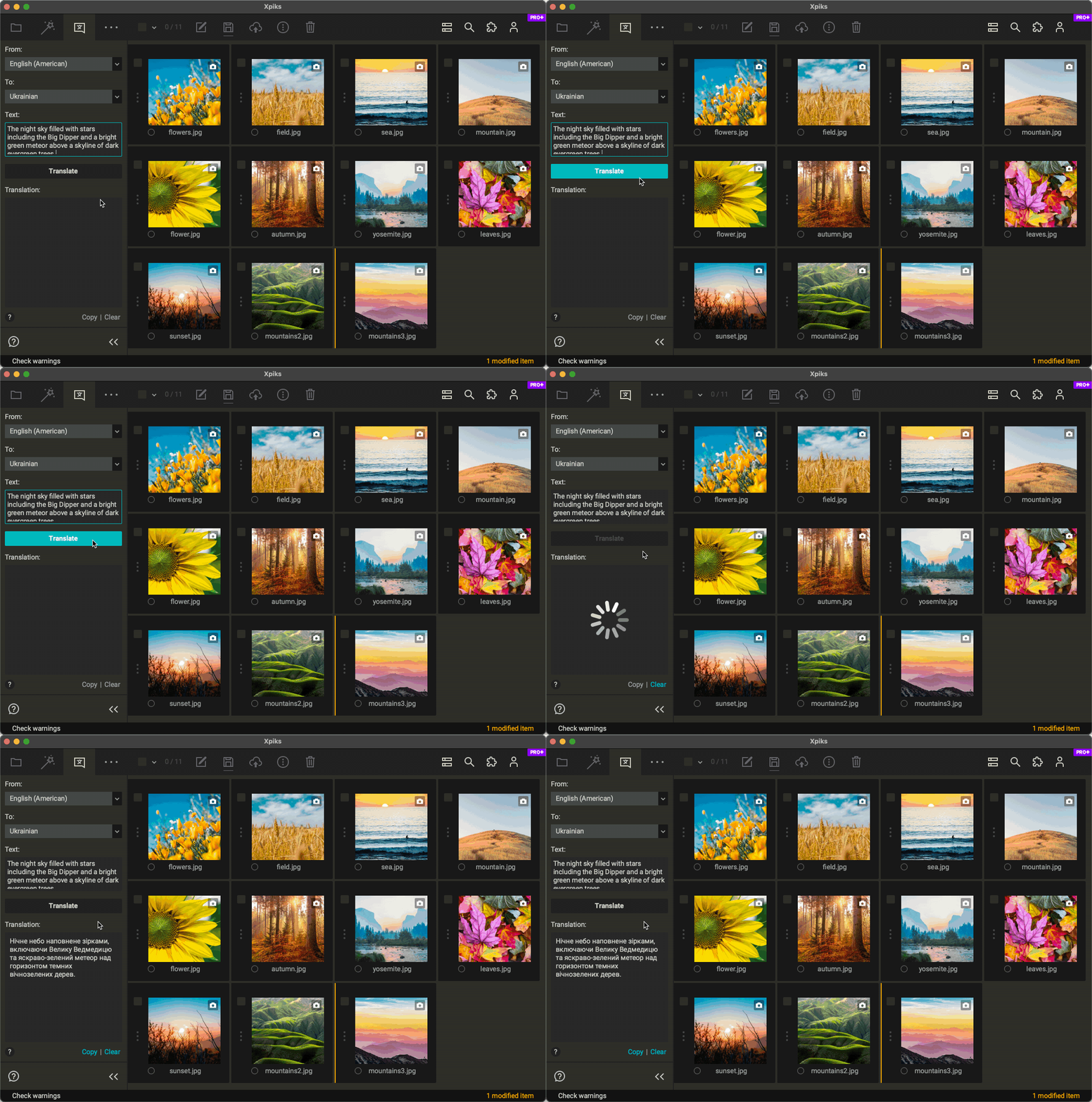
Tab translation

Using context menu

In Title, Description or Keywords fields you can also use translation from the context menu.
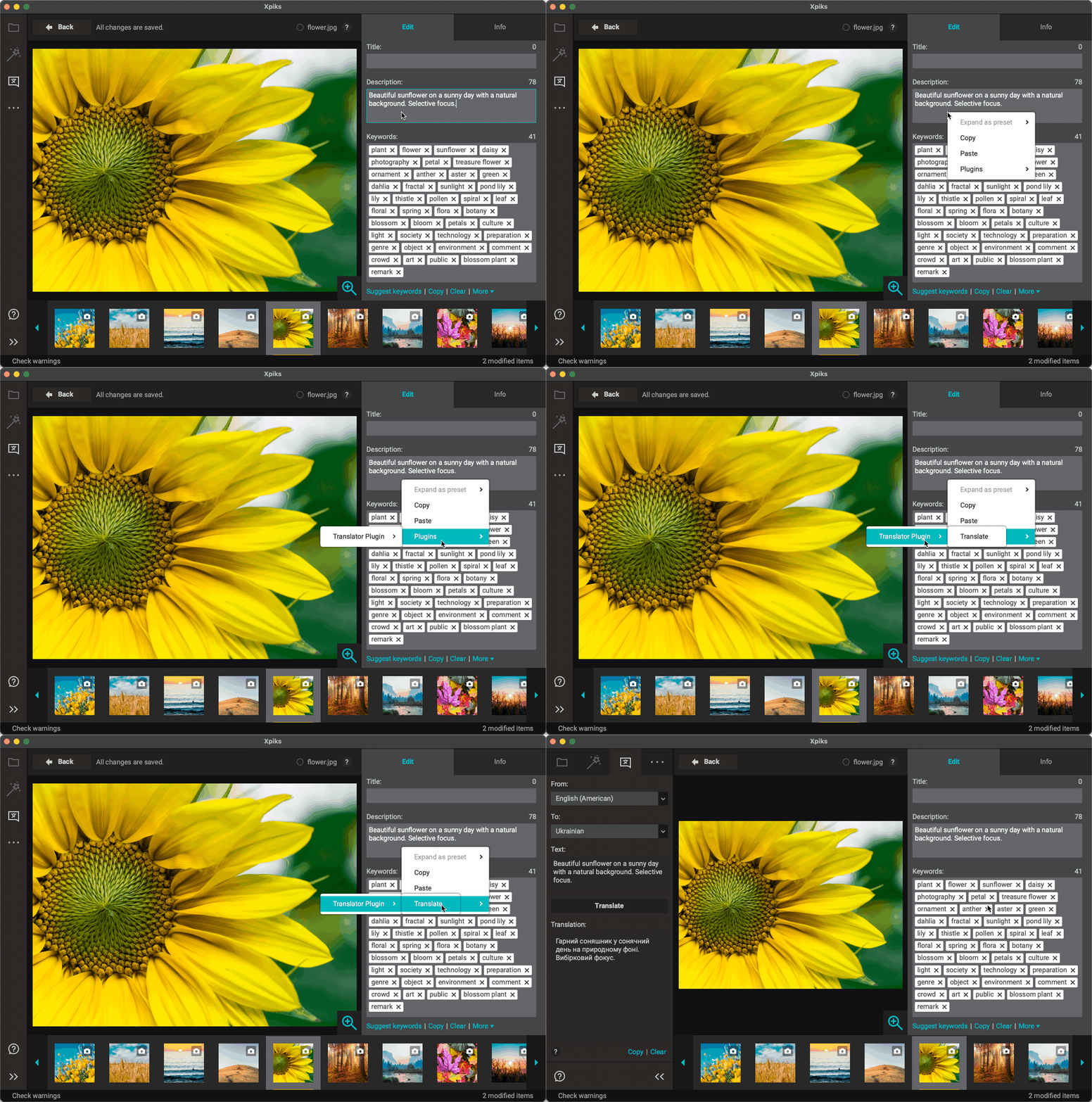
Context menu translation

Get our new articles, studies and reviews

Join 1,216 subscribers

This site is protected by Private Captcha.
  • Affiliate program
  • About
  • Legal
  • Privacy
  • Open Source
  • Write for us
  • Search
  • Support
  • Tutorials
  • FAQ
  • Newsletter
  • Blog
  • Facebook
  • Pinterest
  • Reddit
  • Pricing
  • Pro features
  • Cloud upload
  • Testimonials
  • Downloads
© 2014-2025 Intmaker OÜ