
xpiks tutorials
xpiks tutorials
  • Tutorials
    • Getting started
      • - Adding files
      • - Basic editing
      • - Saving changes
      • - Uploading files
    • Interface
      • - Main window
      • - Single editing view
      • - Batch editing view
      • - Upload dialog
      • - Hotkeys
      • - Filtering
      • - Color tags PRO
    • Keywording
      • - Overview
      • - Spelling
      • - Duplicates
      • - Reorder keywords
      • - Batch delete keywords PRO
      • - AI keywording PRO
    • Suggestions
      • - Overview
      • - Reverse image search PRO
      • - Miscellaneous
      • - Similar images PRO
    • Batch editing
      • - Overview
      • - Partial changes
      • - Appending keywords
    • Uploading
      • - Upload history PRO
      • - Failed uploads
      • - Custom FTP directory PRO
      • - Background upload PRO
      • - Cloud upload PRO
      • - Upload troubleshooting
      • - Agency credentials
    • Presets
      • - Overview
      • - Inserting
      • - Autocomplete
      • - Groups PRO
    • QuickBuffer
      • - Overview PRO
    • Plugins
      • - Installation PRO
      • - Using plugins PRO
    • Integrations
      • - Lightroom PRO
      • - Export CSV
      • - Import CSV PRO
    • License
      • - Activate your license
      • - Start Xpiks Pro trial
      • - Contact support PRO
    • Translator
      • - Overview
    • Miscellaneous
      • - Settings sync PRO
      • - Installing on Windows
      • - Adding copyright PRO
      • - Find and replace PRO
      • - Check Xpiks version
      • - Wipe all metadata
  • Plugins
    • Getting started
      • - Adding files
      • - Basic editing
      • - Saving changes
      • - Uploading files
    • Interface
      • - Main window
      • - Single editing view
      • - Batch editing view
      • - Upload dialog
      • - Hotkeys
      • - Filtering
      • - Color tags PRO
    • Keywording
      • - Overview
      • - Spelling
      • - Duplicates
      • - Reorder keywords
      • - Batch delete keywords PRO
      • - AI keywording PRO
    • Suggestions
      • - Overview
      • - Reverse image search PRO
      • - Miscellaneous
      • - Similar images PRO
    • Batch editing
      • - Overview
      • - Partial changes
      • - Appending keywords
    • Uploading
      • - Upload history PRO
      • - Failed uploads
      • - Custom FTP directory PRO
      • - Background upload PRO
      • - Cloud upload PRO
      • - Upload troubleshooting
      • - Agency credentials
    • Presets
      • - Overview
      • - Inserting
      • - Autocomplete
      • - Groups PRO
    • QuickBuffer
      • - Overview PRO
    • Plugins
      • - Installation PRO
      • - Using plugins PRO
    • Integrations
      • - Lightroom PRO
      • - Export CSV
      • - Import CSV PRO
    • License
      • - Activate your license
      • - Start Xpiks Pro trial
      • - Contact support PRO
    • Translator
      • - Overview
    • Miscellaneous
      • - Settings sync PRO
      • - Installing on Windows
      • - Adding copyright PRO
      • - Find and replace PRO
      • - Check Xpiks version
      • - Wipe all metadata
  • Blog
    • Getting started
      • - Adding files
      • - Basic editing
      • - Saving changes
      • - Uploading files
    • Interface
      • - Main window
      • - Single editing view
      • - Batch editing view
      • - Upload dialog
      • - Hotkeys
      • - Filtering
      • - Color tags PRO
    • Keywording
      • - Overview
      • - Spelling
      • - Duplicates
      • - Reorder keywords
      • - Batch delete keywords PRO
      • - AI keywording PRO
    • Suggestions
      • - Overview
      • - Reverse image search PRO
      • - Miscellaneous
      • - Similar images PRO
    • Batch editing
      • - Overview
      • - Partial changes
      • - Appending keywords
    • Uploading
      • - Upload history PRO
      • - Failed uploads
      • - Custom FTP directory PRO
      • - Background upload PRO
      • - Cloud upload PRO
      • - Upload troubleshooting
      • - Agency credentials
    • Presets
      • - Overview
      • - Inserting
      • - Autocomplete
      • - Groups PRO
    • QuickBuffer
      • - Overview PRO
    • Plugins
      • - Installation PRO
      • - Using plugins PRO
    • Integrations
      • - Lightroom PRO
      • - Export CSV
      • - Import CSV PRO
    • License
      • - Activate your license
      • - Start Xpiks Pro trial
      • - Contact support PRO
    • Translator
      • - Overview
    • Miscellaneous
      • - Settings sync PRO
      • - Installing on Windows
      • - Adding copyright PRO
      • - Find and replace PRO
      • - Check Xpiks version
      • - Wipe all metadata
  • Pricing
    • Getting started
      • - Adding files
      • - Basic editing
      • - Saving changes
      • - Uploading files
    • Interface
      • - Main window
      • - Single editing view
      • - Batch editing view
      • - Upload dialog
      • - Hotkeys
      • - Filtering
      • - Color tags PRO
    • Keywording
      • - Overview
      • - Spelling
      • - Duplicates
      • - Reorder keywords
      • - Batch delete keywords PRO
      • - AI keywording PRO
    • Suggestions
      • - Overview
      • - Reverse image search PRO
      • - Miscellaneous
      • - Similar images PRO
    • Batch editing
      • - Overview
      • - Partial changes
      • - Appending keywords
    • Uploading
      • - Upload history PRO
      • - Failed uploads
      • - Custom FTP directory PRO
      • - Background upload PRO
      • - Cloud upload PRO
      • - Upload troubleshooting
      • - Agency credentials
    • Presets
      • - Overview
      • - Inserting
      • - Autocomplete
      • - Groups PRO
    • QuickBuffer
      • - Overview PRO
    • Plugins
      • - Installation PRO
      • - Using plugins PRO
    • Integrations
      • - Lightroom PRO
      • - Export CSV
      • - Import CSV PRO
    • License
      • - Activate your license
      • - Start Xpiks Pro trial
      • - Contact support PRO
    • Translator
      • - Overview
    • Miscellaneous
      • - Settings sync PRO
      • - Installing on Windows
      • - Adding copyright PRO
      • - Find and replace PRO
      • - Check Xpiks version
      • - Wipe all metadata
    Download
  • Getting started
    • Adding files
    • Basic editing
    • Saving changes
    • Uploading files
  • Interface
    • Main window
    • Single editing view
    • Batch editing view
    • Upload dialog
    • Hotkeys
    • Filtering
    • Color tags PRO
  • Keywording
    • Overview
    • Spelling
    • Duplicates
    • Reorder keywords
    • Batch delete keywords PRO
    • AI keywording PRO+
  • Suggestions
    • Overview
    • Reverse image search PRO+
    • Miscellaneous
    • Similar images PRO
  • Batch editing
    • Overview
    • Partial changes
    • Appending keywords
  • Uploading
    • Upload history PRO
    • Failed uploads
    • Custom FTP directory PRO
    • Background upload PRO
    • Cloud upload PRO+
    • Upload troubleshooting
    • Agency credentials
  • Presets
    • Overview
    • Inserting
    • Autocomplete
    • Groups PRO
  • QuickBuffer
    • Overview PRO
  • Plugins
    • Installation PRO+
    • Using plugins PRO+
  • Integrations
    • Lightroom PRO
    • Export CSV
    • Import CSV PRO
  • License
    • Activate your license
    • Start Xpiks Pro trial
    • Contact support PRO
  • Translator
    • Overview
  • Miscellaneous
    • Settings sync PRO
    • Installing on Windows
    • Adding copyright PRO
    • Find and replace PRO
    • Check Xpiks version
    • Wipe all metadata

KEYWORDING

Overview

The most simple way to add keywords to an artwork is just to type them. When you finish typing the keyword you can press Comma (",") or Enter and what you wrote will be displayed as a separate keyword.
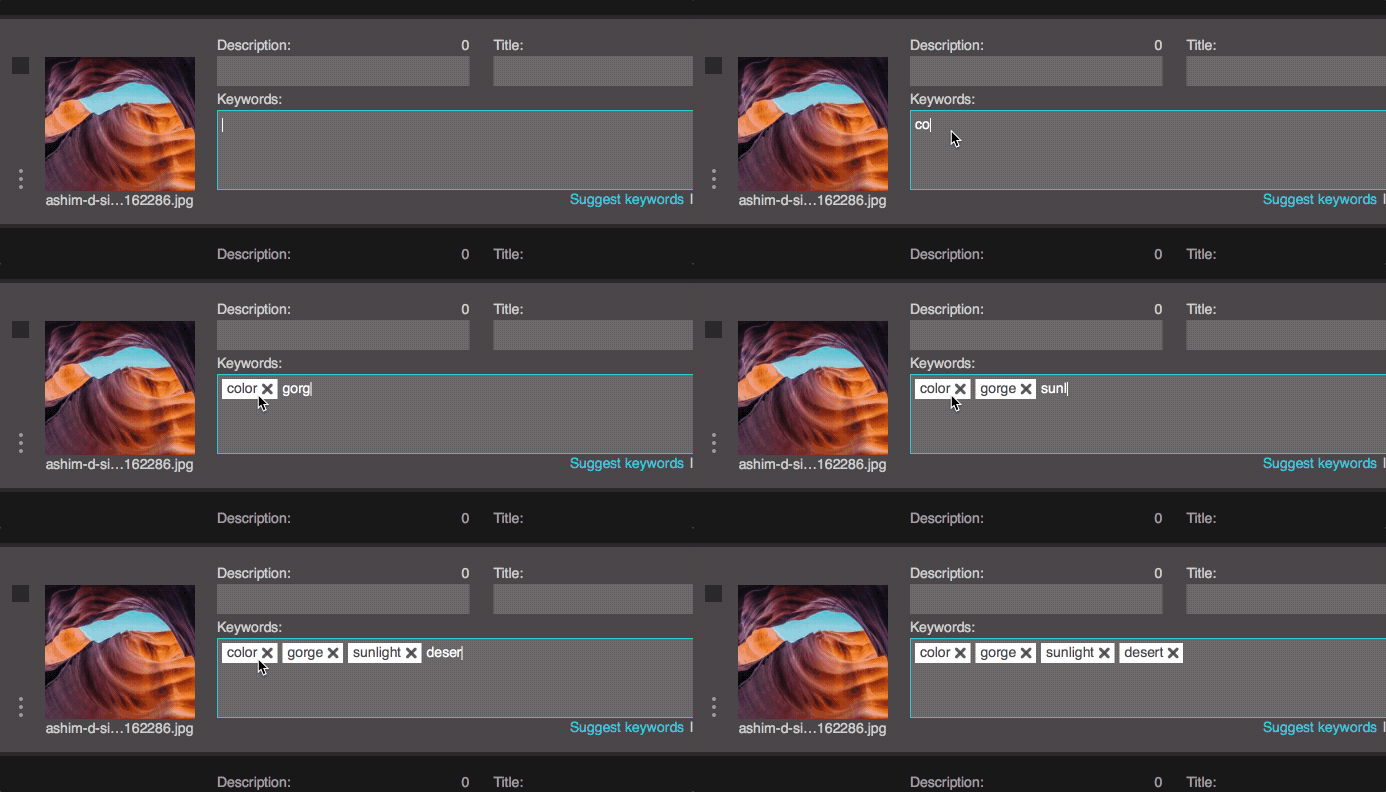
Basic keywording

If you’re typing English keywords, Xpiks can help you by doing autocompletion of what you’re typing. If you want to select the completed item, you need to press Up or Down button to move selection and then Enter to insert it.
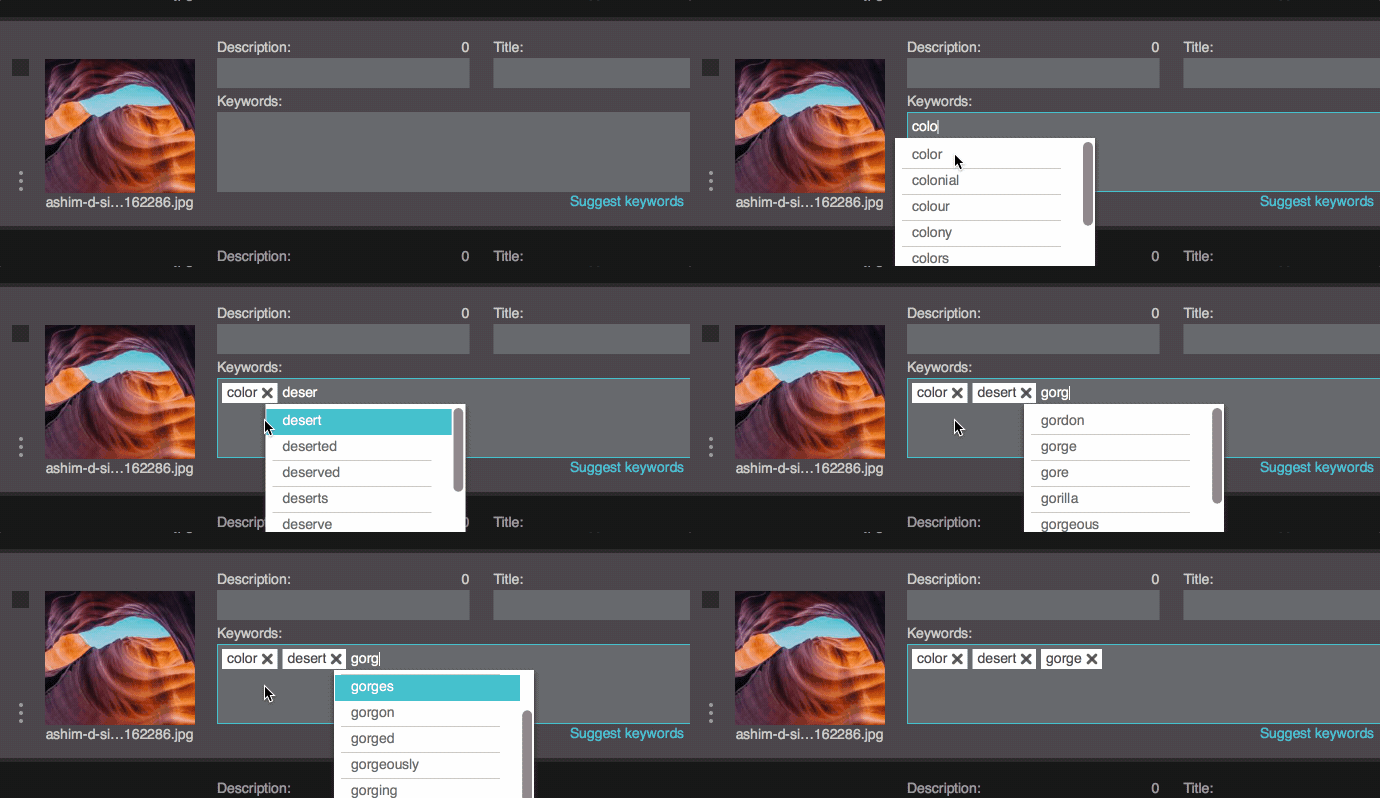
Basic keywording

To remove last keyword you can just press Backspace.

Spelling

Get our new articles, studies and reviews

Join 1,216 subscribers

This site is protected by Private Captcha.
  • Affiliate program
  • About
  • Legal
  • Privacy
  • Open Source
  • Write for us
  • Search
  • Support
  • Tutorials
  • FAQ
  • Newsletter
  • Blog
  • Facebook
  • Pinterest
  • Reddit
  • Pricing
  • Pro features
  • Cloud upload
  • Testimonials
  • Downloads
© 2014-2025 Intmaker OÜ